<?xml version="1.0" encoding="UTF-8"?>
<feed xmlns="http://www.w3.org/2005/Atom">
    <title>Technology on Information</title>
    <link rel="alternate" type="text/html" href="http://tec.toi-planning.net/" />
    <link rel="self" type="application/atom+xml" href="http://tec.toi-planning.net/atom.xml" />
    <id>tag:tec.toi-planning.net,2008-02-14://1</id>
    <updated>2021-01-26T21:44:51Z</updated>
    <subtitle>ToI企画の技術情報です</subtitle>
    <generator uri="http://www.sixapart.com/movabletype/">Movable Type 5.2.2</generator>

<entry>
    <title>QuickRebuild 0.7.5をリリース</title>
    <link rel="alternate" type="text/html" href="http://tec.toi-planning.net/mt/quickrebuild/quickrebuild-075/" />
    <id>tag:tec.toi-planning.net,2021://1.1012</id>

    <published>2021-01-26T07:05:33Z</published>
    <updated>2021-01-26T21:44:51Z</updated>

    <summary>バージョン0.7.5 をリリースしました。 Rebuildletの更新 -ブック...</summary>
    <author>
        <name>Taku AMANO</name>
        
    </author>
    
        <category term="QuickRebuild" scheme="http://www.sixapart.com/ns/types#category" />
    
    <category term="リリース" label="リリース" scheme="http://www.sixapart.com/ns/types#tag" />
    
    <content type="html" xml:lang="ja" xml:base="http://tec.toi-planning.net/">
        <![CDATA[<p>バージョン0.7.5 をリリースしました。</p>
<p>Rebuildletの更新 -ブックマーク版の<a href="http://tec.toi-planning.net/mt/rebuildlet/">rebuildlet</a>もあわせて更新しています。インストール方法は<a href="http://tec.toi-planning.net/mt/rebuildlet/manual/">解説ページ</a>を参照してください。 </p>
<p>以下のURLからダウンロードできます。 <a href="https://github.com/usualoma/mt-plugin-QuickRebuild/releases/tag/v0.7.5">v0.7.5</a></p></p>
]]>
        
    </content>
</entry>

<entry>
    <title>Amazon 1.0.1をリリース</title>
    <link rel="alternate" type="text/html" href="http://tec.toi-planning.net/mt/amazon/amazon-101/" />
    <id>tag:tec.toi-planning.net,2020://1.1010</id>

    <published>2020-05-21T00:35:43Z</published>
    <updated>2020-05-21T00:37:10Z</updated>

    <summary>バージョン1.0.1 をリリースしました。 S3のURLで、デフォルトでhttp...</summary>
    <author>
        <name>Taku AMANO</name>
        
    </author>
    
        <category term="Amazon" scheme="http://www.sixapart.com/ns/types#category" />
    
    <category term="リリース" label="リリース" scheme="http://www.sixapart.com/ns/types#tag" />
    
    <content type="html" xml:lang="ja" xml:base="http://tec.toi-planning.net/">
        <![CDATA[<p>バージョン1.0.1 をリリースしました。</p>
<p>S3のURLで、デフォルトでhttpsが利用されるように変更しました。</p>
<p>以下のURLからダウンロードできます。 <a href="https://github.com/usualoma/mt-plugin-amazon/releases/tag/v1.0.1">v1.0.1</a></p>
]]>
        
    </content>
</entry>

<entry>
    <title>QuickRebuild 0.7.4をリリース</title>
    <link rel="alternate" type="text/html" href="http://tec.toi-planning.net/mt/quickrebuild/quickrebuild-074/" />
    <id>tag:tec.toi-planning.net,2020://1.1009</id>

    <published>2020-05-14T05:34:08Z</published>
    <updated>2020-08-26T05:29:21Z</updated>

    <summary>バージョン0.7.4 をリリースしました。 Rebuildletの更新 -ブック...</summary>
    <author>
        <name>Taku AMANO</name>
        
    </author>
    
        <category term="QuickRebuild" scheme="http://www.sixapart.com/ns/types#category" />
    
    <category term="リリース" label="リリース" scheme="http://www.sixapart.com/ns/types#tag" />
    
    <content type="html" xml:lang="ja" xml:base="http://tec.toi-planning.net/">
        <![CDATA[<p>バージョン0.7.4 をリリースしました。</p>
<p>Rebuildletの更新 -ブックマーク版の<a href="http://tec.toi-planning.net/mt/rebuildlet/">rebuildlet</a>もあわせて更新しています。インストール方法は<a href="http://tec.toi-planning.net/mt/rebuildlet/manual/">解説ページ</a>を参照してください。 </p>
<p>以下のURLからダウンロードできます。 <a href="https://github.com/usualoma/mt-plugin-QuickRebuild/releases/tag/v0.7.4">v0.7.4</a></p></p>
]]>
        
    </content>
</entry>

<entry>
    <title>QuickRebuild 0.7.3をリリース</title>
    <link rel="alternate" type="text/html" href="http://tec.toi-planning.net/mt/quickrebuild/quickrebuild-073/" />
    <id>tag:tec.toi-planning.net,2019://1.1008</id>

    <published>2019-11-12T10:20:08Z</published>
    <updated>2019-11-12T10:21:43Z</updated>

    <summary>バージョン0.7.3 をリリースしました。 新機能はありません。 新しいjQue...</summary>
    <author>
        <name>Taku AMANO</name>
        
    </author>
    
        <category term="QuickRebuild" scheme="http://www.sixapart.com/ns/types#category" />
    
    <category term="リリース" label="リリース" scheme="http://www.sixapart.com/ns/types#tag" />
    
    <content type="html" xml:lang="ja" xml:base="http://tec.toi-planning.net/">
        <![CDATA[<p>バージョン0.7.3 をリリースしました。</p>
<p>新機能はありません。</p>
<p>新しいjQueryのバージョンでの警告を抑制しました。</p>
<p>Rebuildletの更新</p><ul>
<li><p>ブックマーク版の<a href="http://tec.toi-planning.net/mt/rebuildlet/">rebuildlet</a>もあわせて更新しています。インストール方法は<a href="http://tec.toi-planning.net/mt/rebuildlet/manual/">解説ページ</a>を参照してください。</p>
</li>
</ul>
<p>以下のURLからダウンロードできます。<a href="https://github.com/usualoma/mt-plugin-QuickRebuild/releases/tag/v0.7.3">v0.7.3</a></p>
]]>
        
    </content>
</entry>

<entry>
    <title>CustomFieldsSearch 1.2.0 をリリース</title>
    <link rel="alternate" type="text/html" href="http://tec.toi-planning.net/mt/customfieldssearch/customfieldssearch-120/" />
    <id>tag:tec.toi-planning.net,2018://1.1007</id>

    <published>2018-10-05T18:58:06Z</published>
    <updated>2018-10-06T09:26:45Z</updated>

    <summary> バージョン1.2.0 をリリースしました。 主な変更点は以下の通りです。 MT...</summary>
    <author>
        <name>Taku AMANO</name>
        
    </author>
    
        <category term="CustomFieldsSearch" scheme="http://www.sixapart.com/ns/types#category" />
    
    <category term="リリース" label="リリース" scheme="http://www.sixapart.com/ns/types#tag" />
    
    <content type="html" xml:lang="ja" xml:base="http://tec.toi-planning.net/">
        <![CDATA[<p>
バージョン1.2.0 をリリースしました。
</p>

<p>
主な変更点は以下の通りです。
</p>

<ul>
<li>MT7で利用した場合に出力されていた警告が出ないように修正しました。</li>
</ul>

<a href="https://github.com/usualoma/mt-plugin-CustomFieldsSearch/releases">ダウンロードページ</a>]]>
        
    </content>
</entry>

<entry>
    <title>QuickRebuild 0.7.2をリリース</title>
    <link rel="alternate" type="text/html" href="http://tec.toi-planning.net/mt/quickrebuild/quickrebuild-072/" />
    <id>tag:tec.toi-planning.net,2018://1.1006</id>

    <published>2018-05-17T01:50:33Z</published>
    <updated>2019-11-12T10:23:46Z</updated>

    <summary>バージョン0.7.2 をリリースしました。 新機能 Movable Type 7...</summary>
    <author>
        <name>Taku AMANO</name>
        
    </author>
    
        <category term="QuickRebuild" scheme="http://www.sixapart.com/ns/types#category" />
    
    <category term="リリース" label="リリース" scheme="http://www.sixapart.com/ns/types#tag" />
    
    <content type="html" xml:lang="ja" xml:base="http://tec.toi-planning.net/">
        <![CDATA[<p>バージョン0.7.2 をリリースしました。</p>
<p>新機能</p><ul>
<li><p>Movable Type 7 に対応しました</p>
</li>
<li><p>再構築完了後に通知を表示できるようになりました</p>
</li>
</ul>
<p>Movable Type 7 での変更</p><ul>
<li><p>デフォルトでは、「再構築」のメニューは表示されなくなりました</p><ul>
<li><p>mt-config.cgiに「QuickRebuildShowMenu 1」を追加すると、これまで通り「再構築」のメニューを表示させることができます</p>
</li>
</ul>
</li>
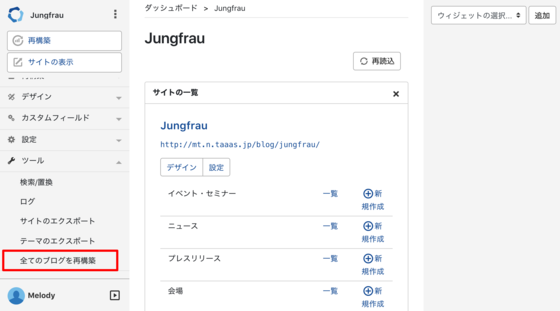
<li><p>QuickRebuildによる再構築は「ツール > 全てのブログを再構築」から行うようになりました</p>
</li>
</ul>
<p><img src="http://tec.toi-planning.net/assets_c/2018/05/rebuild-all-blog-menu-thumb-560x311-370.png" /></p>
<p>Rebuildletの更新</p><ul>
<li><p>ブックマーク版の<a href="http://tec.toi-planning.net/mt/rebuildlet/">rebuildlet</a>もあわせて更新しています。インストール方法は<a href="http://tec.toi-planning.net/mt/rebuildlet/manual/">解説ページ</a>を参照してください。</p>
</li>
</ul>
<p></p>
<p><iframe width="560" height="315" src="//www.youtube.com/embed/CXQJdaVmCxI" frameborder="0" allow="autoplay; encrypted-media" allowfullscreen></iframe></p>
<p>以下のURLからダウンロードできます。<a href="https://github.com/usualoma/mt-plugin-QuickRebuild/releases/tag/v0.7.2">v0.7.2</a></p>
]]>
        
    </content>
</entry>

<entry>
    <title>rebuildlet 0.6.4 をリリース</title>
    <link rel="alternate" type="text/html" href="http://tec.toi-planning.net/mt/rebuildlet/rebuildlet-064/" />
    <id>tag:tec.toi-planning.net,2016://1.1005</id>

    <published>2016-08-03T01:28:31Z</published>
    <updated>2016-08-03T01:36:10Z</updated>

    <summary>バージョン 0.6.4 をリリースしました MT6で発生していた不具合を修正しま...</summary>
    <author>
        <name>Taku AMANO</name>
        
    </author>
    
        <category term="rebuildlet" scheme="http://www.sixapart.com/ns/types#category" />
    
    
    <content type="html" xml:lang="ja" xml:base="http://tec.toi-planning.net/">
        <![CDATA[<p>バージョン 0.6.4 をリリースしました</p>

<ul>
<li>MT6で発生していた不具合を修正しました</li>
<li>Google Code の終了で利用できなくなっていたので、GitHub Pages 経由で実行できるよう修正しました</li>
</ul>

<p>インストールは<a href="http://tec.toi-planning.net/mt/rebuildlet/manual/">解説ページ</a>から行ってください。<br />(旧バージョンの rebuildret がインストールされている場合には一度削除してから、再度上のリンク先の手順でインストールしてください)</p>

<h3>Thanks!</h3>
<p>
このバージョンには <a href="https://github.com/taiju" target="_blank">@taiju</a> さんに GitHub でもらった Pull request が含まれています。
</p>]]>
        
    </content>
</entry>

<entry>
    <title>QuickRebuild 0.6.3をリリース</title>
    <link rel="alternate" type="text/html" href="http://tec.toi-planning.net/mt/quickrebuild/063---url-v063httpsgithubcomus/" />
    <id>tag:tec.toi-planning.net,2016://1.1004</id>

    <published>2016-04-29T21:36:26Z</published>
    <updated>2020-07-22T05:47:53Z</updated>

    <summary>バージョン0.6.3 をリリースしました。 修正点は以下の通りです。 ブログにし...</summary>
    <author>
        <name>Taku AMANO</name>
        
    </author>
    
        <category term="QuickRebuild" scheme="http://www.sixapart.com/ns/types#category" />
    
    <category term="リリース" label="リリース" scheme="http://www.sixapart.com/ns/types#tag" />
    
    <content type="html" xml:lang="ja" xml:base="http://tec.toi-planning.net/">
        <![CDATA[<p>バージョン0.6.3 をリリースしました。</p>
<p>修正点は以下の通りです。</p><ul>
<li><p>ブログにしか再構築権限を持っていない(サイトに対しては持っていない)ユーザーで発生していた問題の修正</p>
</li>
</ul>
<p>以下のURLからダウンロードできます。<a href="https://github.com/usualoma/mt-plugin-QuickRebuild/releases/tag/v0.6.3">v0.6.3</a></p>
]]>
        
    </content>
</entry>

<entry>
    <title>rebuildlet 0.4 をリリース</title>
    <link rel="alternate" type="text/html" href="http://tec.toi-planning.net/mt/rebuildlet/rebuildlet-04/" />
    <id>tag:tec.toi-planning.net,2015://1.1003</id>

    <published>2015-01-26T19:34:22Z</published>
    <updated>2016-06-07T05:23:13Z</updated>

    <summary>バージョン 0.4 をリリースしました MT6で動作するようになりました インス...</summary>
    <author>
        <name>Taku AMANO</name>
        
    </author>
    
        <category term="rebuildlet" scheme="http://www.sixapart.com/ns/types#category" />
    
    <category term="リリース" label="リリース" scheme="http://www.sixapart.com/ns/types#tag" />
    
    <content type="html" xml:lang="ja" xml:base="http://tec.toi-planning.net/">
        <![CDATA[<p>バージョン 0.4 をリリースしました</p>
<ul>
<li>MT6で動作するようになりました</li>
</ul>
<p>インストールは<a href="http://tec.toi-planning.net/mt/rebuildlet/manual/">解説ページ</a>から行ってください。<br />(旧バージョンの rebuildret がインストールされている場合には一度削除してから、再度上のリンク先の手順でインストールしてください)</p>]]>
        
    </content>
</entry>

<entry>
    <title>QuickRebuild 0.6.2をリリース</title>
    <link rel="alternate" type="text/html" href="http://tec.toi-planning.net/mt/quickrebuild/quickrebuild-062/" />
    <id>tag:tec.toi-planning.net,2014://1.1002</id>

    <published>2014-11-26T19:37:45Z</published>
    <updated>2016-03-02T15:58:20Z</updated>

    <summary>バージョン0.6.2 をリリースしました。 修正点は以下の通りです。 HTTPS...</summary>
    <author>
        <name>Taku AMANO</name>
        
    </author>
    
        <category term="QuickRebuild" scheme="http://www.sixapart.com/ns/types#category" />
    
    <category term="リリース" label="リリース" scheme="http://www.sixapart.com/ns/types#tag" />
    
    <content type="html" xml:lang="ja" xml:base="http://tec.toi-planning.net/">
        <![CDATA[<p>バージョン0.6.2 をリリースしました。</p>
<p>修正点は以下の通りです。</p><ul>
<li><p>HTTPS の環境で発生するエラーを修正しました (クラウド版MTで発生していた問題はこれで解消されると思います)</p>
</li>
</ul>
<p><a href="https://tec.toi-planning.net/downloads/QuickRebuild-0.6.2.zip">QuickRebuild-0.6.2.zip</a></p>
<p><a href="https://tec.toi-planning.net/downloads/QuickRebuild-0.6.2.tgz">QuickRebuild-0.6.2.tgz</a></p>
]]>
        
    </content>
</entry>

<entry>
    <title>QuickRebuild 0.6.1をリリース</title>
    <link rel="alternate" type="text/html" href="http://tec.toi-planning.net/mt/quickrebuild/quickrebuild-061/" />
    <id>tag:tec.toi-planning.net,2014://1.1001</id>

    <published>2014-06-20T01:51:27Z</published>
    <updated>2019-11-12T10:23:37Z</updated>

    <summary>バージョン0.6.1 をリリースしました。 修正点は以下の通りです。 Fixrf...</summary>
    <author>
        <name>Taku AMANO</name>
        
    </author>
    
        <category term="QuickRebuild" scheme="http://www.sixapart.com/ns/types#category" />
    
    <category term="リリース" label="リリース" scheme="http://www.sixapart.com/ns/types#tag" />
    
    <content type="html" xml:lang="ja" xml:base="http://tec.toi-planning.net/">
        <![CDATA[<p>バージョン0.6.1 をリリースしました。</p>
<p>修正点は以下の通りです。</p><ul>
<li><p>Fixrfox 30 で発生するエラーを修正しました</p>
</li>
</ul>
<p><a href="https://tec.toi-planning.net/downloads/QuickRebuild-0.6.1.zip">QuickRebuild-0.6.1.zip</a></p>
<p><a href="https://tec.toi-planning.net/downloads/QuickRebuild-0.6.1.tgz">QuickRebuild-0.6.1.tgz</a></p>
]]>
        
    </content>
</entry>

<entry>
    <title>Amazon 0.0.3 をリリース</title>
    <link rel="alternate" type="text/html" href="http://tec.toi-planning.net/mt/amazon/amazon-003/" />
    <id>tag:tec.toi-planning.net,2013://1.1000</id>

    <published>2013-12-14T01:11:02Z</published>
    <updated>2020-05-21T00:38:29Z</updated>

    <summary>バージョン 0.0.3 をリリースしました。 修正点は以下の通りです。 -PSG...</summary>
    <author>
        <name>Taku AMANO</name>
        
    </author>
    
        <category term="Amazon" scheme="http://www.sixapart.com/ns/types#category" />
    
    <category term="リリース" label="リリース" scheme="http://www.sixapart.com/ns/types#tag" />
    
    <content type="html" xml:lang="ja" xml:base="http://tec.toi-planning.net/">
        <![CDATA[<p><p>バージョン 0.0.3 をリリースしました。 修正点は以下の通りです。 -PSGI 環境での安定性の向上 <a href="https://github.com/usualoma/mt-plugin-amazon">ダウンロードページ</a></p></p>
]]>
        
    </content>
</entry>

<entry>
    <title>LivePreviewTemplate とは</title>
    <link rel="alternate" type="text/html" href="http://tec.toi-planning.net/mt-column/plugin/livepreviewtemplate/" />
    <id>tag:tec.toi-planning.net,2013://1.999</id>

    <published>2013-03-11T02:10:15Z</published>
    <updated>2014-03-17T07:14:19Z</updated>

    <summary>Sublime Text 2 で MT タグを補完することができる MTML-S...</summary>
    <author>
        <name>Taku AMANO</name>
        
    </author>
    
        <category term="Plugin" scheme="http://www.sixapart.com/ns/types#category" />
    
    
    <content type="html" xml:lang="ja" xml:base="http://tec.toi-planning.net/">
        <![CDATA[<p><span>Sublime Text 2 で MT タグを補完することができる <a href="https://github.com/bit-part/MTML-ST2" target="_blank">MTML-ST2</a> が最近熱いようなので、それにあやかってローカルのファイルとMTを繋ぐための、<a href="https://github.com/usualoma/mt-plugin-LivePreviewTemplate" target="_blank">LivePreviewTemplate</a> というプラグインを作ってみました。</span></p>
<p><!-- copy and paste. Modify height and width if desired. --> <object id="scPlayer" width="519" height="364" classid="clsid:d27cdb6e-ae6d-11cf-96b8-444553540000" codebase="http://download.macromedia.com/pub/shockwave/cabs/flash/swflash.cab#version=6,0,40,0"><param name="quality" value="high" /><param name="flashVars" value="thumb=http://content.screencast.com/users/usualoma/folders/Jing/media/909823b0-e88d-427b-a5cc-f98d6e7977d6/FirstFrame.jpg&amp;containerwidth=887&amp;containerheight=621&amp;content=http://content.screencast.com/users/usualoma/folders/Jing/media/909823b0-e88d-427b-a5cc-f98d6e7977d6/00000015.swf&amp;blurover=false" /><param name="allowFullScreen" value="true" /><param name="scale" value="showall" /><param name="allowScriptAccess" value="always" /><param name="base" value="http://content.screencast.com/users/usualoma/folders/Jing/media/909823b0-e88d-427b-a5cc-f98d6e7977d6/" /><param name="src" value="http://content.screencast.com/users/usualoma/folders/Jing/media/909823b0-e88d-427b-a5cc-f98d6e7977d6/jingswfplayer.swf" /><param name="flashvars" value="thumb=http://content.screencast.com/users/usualoma/folders/Jing/media/909823b0-e88d-427b-a5cc-f98d6e7977d6/FirstFrame.jpg&amp;containerwidth=887&amp;containerheight=621&amp;content=http://content.screencast.com/users/usualoma/folders/Jing/media/909823b0-e88d-427b-a5cc-f98d6e7977d6/00000015.swf&amp;blurover=false" /><param name="allowfullscreen" value="true" /><param name="allowscriptaccess" value="always" /><embed id="scPlayer" width="519" height="364" type="application/x-shockwave-flash" src="http://content.screencast.com/users/usualoma/folders/Jing/media/909823b0-e88d-427b-a5cc-f98d6e7977d6/jingswfplayer.swf" quality="high" flashVars="thumb=http://content.screencast.com/users/usualoma/folders/Jing/media/909823b0-e88d-427b-a5cc-f98d6e7977d6/FirstFrame.jpg&amp;containerwidth=887&amp;containerheight=621&amp;content=http://content.screencast.com/users/usualoma/folders/Jing/media/909823b0-e88d-427b-a5cc-f98d6e7977d6/00000015.swf&amp;blurover=false" allowFullScreen="true" scale="showall" allowScriptAccess="always" base="http://content.screencast.com/users/usualoma/folders/Jing/media/909823b0-e88d-427b-a5cc-f98d6e7977d6/" flashvars="thumb=http://content.screencast.com/users/usualoma/folders/Jing/media/909823b0-e88d-427b-a5cc-f98d6e7977d6/FirstFrame.jpg&amp;containerwidth=887&amp;containerheight=621&amp;content=http://content.screencast.com/users/usualoma/folders/Jing/media/909823b0-e88d-427b-a5cc-f98d6e7977d6/00000015.swf&amp;blurover=false" allowfullscreen="true" allowscriptaccess="always" /></object></p>
<h3>できること</h3>
<ul>
<li>テンプレートファイルを、デスクトップからドラッグアンドドロップで MT に取り込むことができます。</li>
<li>ファイルの変更後、即座にプレビューの HTML を表示させることができます。</li>
</ul>
<h3>対応しているMT</h3>
<ul>
<li>5.2</li>
</ul>
<h3>対応しているブラウザ</h3>
<ul>
<li>Google Chrome</li>
<li>Firefox</li>
<li>Safari</li>
</ul>
<p>ポップアップウィンドウの許可が必要な場合があります</p>
<h3>ブックマークレットの登録と起動</h3>
<ol>
<li><a href="javascript:(function(){var%20s=document.createElement('script');s.setAttribute('src','https://github.com/usualoma/mt-plugin-LivePreviewTemplate/raw/master/mt-static/plugins/LivePreviewTemplate/LivePreviewTemplate.js?ts='+new Date().getTime());document.getElementsByTagName('body')[0].appendChild(s);})();">LivePreviewTemplate</a> をブラウザのブックマークに登録します。</li>
<li>「テンプレートの編集」画面を開きます。</li>
<li>登録したブックマークをクリックします。</li>
</ol>
<h3>ライセンス</h3>
<p>MITライセンス</p>
<h3>リポジトリ</h3>
<p><a href="https://github.com/usualoma/mt-plugin-LivePreviewTemplate" target="_blank">mt-plugin-LivePreviewTemplate</a></p>
<h3>参考にした情報</h3>
<ul>
<li><a href="http://blog.k11i.biz/2013/02/markdown.html" target="_blank">楽して Markdown ファイルをリアルタイムプレビューできる仕組みを作ったった</a></li>
</ul>]]>
        
    </content>
</entry>

<entry>
    <title>三点リーダー(…)を MT の TinyMCE を使って真ん中に表示する方法</title>
    <link rel="alternate" type="text/html" href="http://tec.toi-planning.net/mt-column/plugin/TinyMCELanguageSelect/" />
    <id>tag:tec.toi-planning.net,2013://1.998</id>

    <published>2013-03-08T02:30:23Z</published>
    <updated>2014-03-20T08:53:07Z</updated>

    <summary>三点リーダー(…)を真ん中に表示する方法からバトンを渡された気がしたので、Tin...</summary>
    <author>
        <name>Taku AMANO</name>
        
    </author>
    
        <category term="Plugin" scheme="http://www.sixapart.com/ns/types#category" />
    
    
    <content type="html" xml:lang="ja" xml:base="http://tec.toi-planning.net/">
        <![CDATA[<p><a href="http://blog.sixapart.jp/" target="_blank">三点リーダー(<span lang="ja" style="font-family: san-serif;">…</span>)を真ん中に表示する方法</a>からバトンを渡された気がしたので、TinyMCE でなんとかしてしまうためのプラグインを作成しました。</p>
<ul>
<li><a href="https://github.com/usualoma/mt-plugin-TinyMCELanguageSelect" target="_blank">TinyMCELanguageSelect</a></li>
</ul>
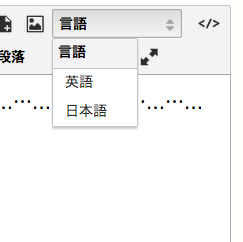
<p><img alt="screenshot.png" src="http://tec.toi-planning.net/screenshot.png" width="243" height="242" class="mt-image-center" style="text-align: center; display: block; margin: 0 auto 20px;" /></p>
<p>範囲選択をした状態で「言語」のプルダウンメニューから「日本語」を選択すると、「&lt;span lang="ja"&gt;選択した文字列&lt;/span&gt;」のようなHTMLに変換されます。</p>
<p>プラグインには編集領域用の CSS が含まれていて、そこには参照先の記事で紹介されていた「span:lang(ja) {font-family: san-serif}」が書かれているので、インストールするだけで編集領域内の…は<span lang="ja" style="font-family: san-serif;">…</span>になります。公開側でも同じ見た目にするためには、公開側の CSS を編集する必要があります。</p>
<p>プラグインを構成しているのは以下の3つファイルのみで非常にシンプルな作りになっているので、TinyMCE を拡張するプラグインを書く際のひな形としても利用できると思います。</p>
<ul>
<li><a href="https://github.com/usualoma/mt-plugin-TinyMCELanguageSelect/blob/master/plugins/TinyMCELanguageSelect/config.yaml" target="_blank">plugins/TinyMCELanguageSelect/config.yaml</a></li>
<li><a href="https://github.com/usualoma/mt-plugin-TinyMCELanguageSelect/blob/master/plugins/TinyMCELanguageSelect/tmpl/extension.tmpl" target="_blank">plugins/TinyMCELanguageSelect/tmpl/extension.tmpl</a></li>
<li><a href="https://github.com/usualoma/mt-plugin-TinyMCELanguageSelect/blob/master/mt-static/plugins/TinyMCELanguageSelect/content.css" target="_blank">mt-static/plugins/TinyMCELanguageSelect/content.css</a></li>
</ul>
<p>ちなみに個人的には真ん中派ですが、自分で文章を書く場合には<span lang="ja" style="font-family: san-serif;">…</span>を使いません。</p>]]>
        
    </content>
</entry>

<entry>
    <title>SexyColorExtractor とは</title>
    <link rel="alternate" type="text/html" href="http://tec.toi-planning.net/mt/sexycolorextractor/about/" />
    <id>tag:tec.toi-planning.net,2012://1.997</id>

    <published>2012-12-24T14:00:00Z</published>
    <updated>2014-03-20T08:13:57Z</updated>

    <summary>メリークリスマス！ これはMovable Type Advent Calenda...</summary>
    <author>
        <name>Taku AMANO</name>
        
    </author>
    
        <category term="SexyColorExtractor" scheme="http://www.sixapart.com/ns/types#category" />
    
    
    <content type="html" xml:lang="ja" xml:base="http://tec.toi-planning.net/">
        <![CDATA[<p>メリークリスマス！</p>
<p>これは<a href="http://www.adventar.org/calendars/26" target="_blank">Movable Type Advent Calendar 2012</a>の24日目の記事です。</p>
<p>クリスマスにちなんで、iTunes11 のようなシャレオツな表示を実現するためのプラグインを作成したのでご紹介します。</p>
<h3>できること</h3>
<ul>
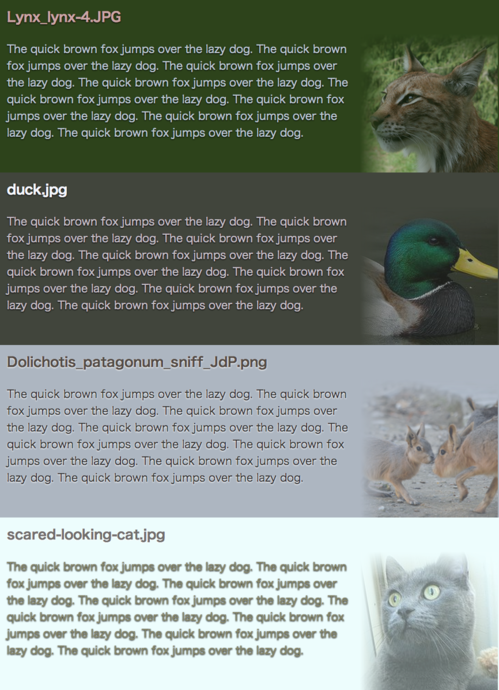
<li>画像からお洒落っぽい感じで色を抜き出すことができます。</li>
<li>以下のタイプの色情報をMTタグで出力することができます。
<ul>
<li>RGB</li>
<li>HSV</li>
</ul>
</li>
</ul>
<h3>出力例</h3>
<p><a href="http://tec.toi-planning.net/assets_c/2012/12/output-sample-366.html" onclick="window.open('http://tec.toi-planning.net/assets_c/2012/12/output-sample-366.html','popup','width=866,height=1196,scrollbars=no,resizable=no,toolbar=no,directories=no,location=no,menubar=no,status=no,left=0,top=0'); return false"><img src="http://tec.toi-planning.net/assets_c/2012/12/output-sample-thumb-500x690-366.png" width="500" height="690" alt="output-sample.png" class="mt-image-center" style="text-align: center; display: block; margin: 0 auto 20px;" /></a></p>
<h3>テンプレート</h3>
<p>
<script src="https://gist.github.com/2b84b30a468b2e153b2c.js" type="text/javascript"></script>
</p>
<h3>タグ</h3>
<ul>
<li>AssetSexyBackgroundColor</li>
<li>AssetSexyTextMainColor</li>
<li>AssetSexyTextSubColor</li>
</ul>
<h4>モディファイア (全タグ共通)</h4>
<dl>
<dt>map="RGB | HSV" (default: "RGB")</dt>
<dt>format="output-format" (default: "rgb(%d, %d, %d)")</dt>
</dl>
<h3>対応しているMT</h3>
<ul>
<li>5以降 (動作確認は 5.2 のみ)</li>
</ul>
<h3>対応している出力方法</h3>
<ul>
<li>スタティックパブリッシング</li>
<li><span style="line-height: 1.62;">ダイナミックパブリッシング</span>
<ul>
<li><span style="line-height: 1.62;">インストール後にアップロードした画像に対してのみ出力可能です。</span></li>
<li>フォーマットの指定に"$"を使う場合には"\"でエスケープをする必要があります。(例: format="%3\$d")</li>
</ul>
</li>
</ul>
<h3>必要な環境</h3>
<ul>
<li>ImageMagick が利用可能であること (かつ ImageDriver が ImageMagick であること)</li>
</ul>
<h3>インストール</h3>
<ol>
<li><a href="https://github.com/usualoma/mt-plugin-SexyColorExtractor/archive/master.zip" target="_blank">ZIP ファイル</a>をダウンロードします。</li>
<li>ダウンロードしたファイルを展開します。</li>
<li>plugins/SexyColorExtractor を、インストール先のMTに plugins/SexyColorExtractor としてアップロードします。</li>
<li>設置完了です。</li>
</ol>
<h3>ライセンス</h3>
<p>MITライセンス</p>
<h3>リポジトリ</h3>
<p><a href="https://github.com/usualoma/mt-plugin-SexyColorExtractor" target="_blank">usualoma/mt-plugin-SexyColorExtractor</a></p>
<h3>参考にした情報</h3>
<ul>
<li><span><a href="http://fladdict.net/blog/2012/11/itunes11_colorpicker.html" target="_blank">iTunes11のアルバム情報表示に使われるオシャレアルゴリズムを考える | fladdict</a></span></li>
<li><a href="http://jsdo.it/blogparts/cOMP" target="_blank"><span>オシャレアルゴリズム - jsdo.it - share JavaScript, HTML5 and CSS</span></a></li>
</ul>]]>
        
    </content>
</entry>

</feed>